Core Proportions and Print Specs for Authentic Contact Sheets
Miscalculating frame resolution or gutter spacing turns a treasured sequence of phone photos into a muddy, unreadable thumbnail grid where faces blur and dark shadows block up completely on paper. Establish the crop ratio, output dimensions, and frame footprint before adding decorative borders: inconsistent crops disrupt the strips, while undersized source files and clogged shadows make faces unreadable on paper. Three parameters govern a convincing 35mm contact-sheet-style print: locking every image to a strict 3:2 aspect ratio, setting a portrait 8x10-inch canvas at 300 PPI, and keeping thumbnail sizes scaled proportionally to classic 24x36mm negative dimensions.
An 8x10-inch portrait canvas at 300 PPI contains 2400x3000 pixels. PPI specifies image sampling rather than the printer's physical ink-dot resolution.
Why must a six-frame horizontal strip be scaled slightly down from true darkroom size? A conventional full-frame 35mm image measures approximately 36x24 mm, which corresponds to roughly 425x283 pixels at 300 PPI. Six 36 mm negative images already span 216 mm, so an 8-inch-wide sheet (203.2 mm, more or less) cannot hold that row at true size even before adding rebate spacing. Scaling each frame to 330x220 pixels produces an image measuring approximately 27.94x18.63 mm at 300 PPI—preserving the unmistakable visual rhythm of a contact sheet while fitting six exposures cleanly across the page.
Color and density accuracy require physical verification before committing to a final print run. Evaluate a proposed proof under approximately 2700–3000 K tungsten illumination and indirect daylight. Home inkjet results vary depending on paper optical brighteners, which can appear noticeably different as the illumination's ultraviolet content changes.
Curating Phone Roll Sequences and Unifying Aspect Ratios
A compelling retro photography contact sheet tells a continuous story rather than showcasing isolated highlights. Select 30 to 36 chronological frames—including near-duplicates, a slightly blurred moving shot, and transitions between stops—to mimic the unedited narrative flow of an actual roll of 35mm film. A six-by-six layout accommodates 36 frames, whereas seven rows of five accommodate 35.
Mobile photography sensors typically capture in 4:3 or 16:9 aspect ratios, which immediately break the geometry of a 35mm strip if left uncropped. Batch-convert native smartphone captures into classic 3:2 horizontal proportions so every frame aligns cleanly inside the film strips.
- Standard 4:3 captures: A 4032x3024-pixel 4:3 photograph becomes 4032x2688 pixels when cropped to landscape 3:2 using its full width; a centered crop removes 168 pixels from both the top and bottom.
- Widescreen 16:9 captures: A 3840x2160-pixel 16:9 photograph becomes 3240x2160 pixels when cropped to 3:2 using its full height, with a centered crop removing 300 pixels from each side.
- Vertical captures: For a portrait photograph, make a 2:3 crop and rotate it 90 degrees for placement in the landscape film-strip rectangle. This preserves the portrait composition while keeping the strip geometry consistent.
After batch cropping, inspect individual frames to ensure the automated center cut did not clip faces or critical horizon lines. Apply one shared color profile or monochrome conversion across the entire batch before layout so lighting shifts read like natural roll progression rather than mismatched digital filters. Adjust exposure and white balance per photograph rather than imposing identical exposure corrections on every frame.
Building the 35mm Sprocket Rebate and Six-Strip Grid
Build the image rectangles first, then add the black surround, perforations, and numbering as separate layers. Set up an RGB black (#000000) background canvas and let the selected print workflow handle color conversion rather than inserting a generic CMYK rich-black recipe into an RGB photograph. Divide the layout into six horizontal rows of six frames, leaving breathing room in the top margin for header notes.
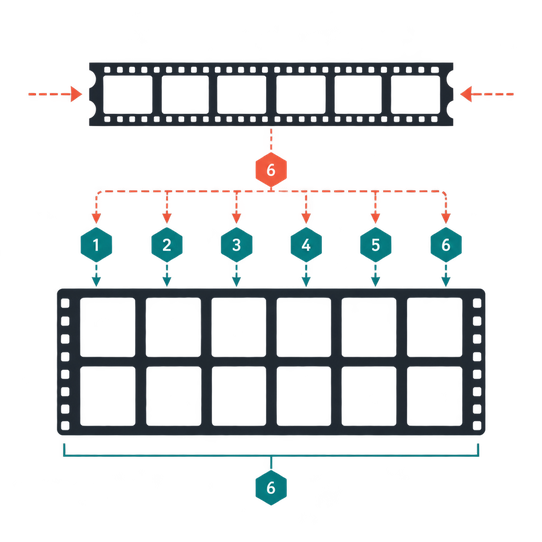
When working at miniature scale, choose clean vector perforations for the layout instead of a low-resolution scanned border, because scan softness and embedded dust can obscure tiny edge lettering. Construct the film rebate details with precision:
- Perforation pitch: Standard full-frame 35mm transport advances eight perforation pitches per exposure. Placing eight perforations above and eight below each frame provides a far more specific visual reference than arbitrarily spaced decorative holes.
- Rebate tone: When imitating a negative laid on photographic paper, pale sprocket openings against a dark rebate are visually appropriate because unobstructed light through the perforations exposes the paper.
- Frame numbering: Keep primary exposure labels sequential from 1 to 36. While some film edge markings include intermediate A labels, 36A is not a universal designation for the thirty-sixth exposure.
- Typography scale: Use restrained amber or off-white edge lettering. At 300 PPI, 6-point lettering is approximately 25 pixels high, providing a practical starting size for a physical proof.
Paper Stocks, Shadow Compensation, and Export Settings
Why do miniature frames on a printed contact sheet often look much darker than they appeared on a phone screen? Screen brightness, paper white, ink spread, and the paper's achievable black level are distinct physical factors that compress dark tones on paper. Make a physical proof on the intended paper before adjusting the entire batch. Inspect faces, dark clothing, and shaded scenery; lift the lower midtones or shadows only where the proof loses useful detail.
Selecting Luster Versus Matte Finishes
Choosing the right surface shapes both the tactile feel and shadow depth of the sheet. Pearl or luster resin-coated (RC) inkjet photo paper provides a photographic sheen associated with many darkroom RC prints, though inkjet luster is chemically distinct from traditional silver-gelatin paper. Heavy cotton-rag matte provides a softer, nonreflective presentation suited to vintage scrapbooking work.
Exporting and Sharpening Without Halos
Preserve the exact 2400x3000-pixel dimensions when exporting an uncompressed TIFF or maximum-quality JPEG. For a typical consumer photo-print workflow, embed sRGB unless the printing service specifies another profile. Apply mild output sharpening after final resizing and inspect the sprocket lettering at 100 percent display magnification for halos, judging its actual readability on the physical proof.
Lock Print Scaling Settings: Print at 8x10 inches with scaling disabled because borderless expansion can enlarge the file and trim the outer margin. If a home printer cannot retain the full 8x10-inch image area without scaling or borderless enlargement, it will alter the specified frame dimensions—print onto a larger sheet and trim to size to preserve the exact geometry.
For long-term preservation in albums or frames, consult the Library of Congress guidelines on caring for photographic prints.
36-Frame Weekend Road Trip Sheet on an 8x10 Luster Print
In this build, 36 smartphone originals from a Friday-evening-to-Sunday-evening coastal drive become a finished 8x10-inch physical contact sheet.
- Prepare the sequence: Gather the 36 coastal drive photographs, process any raw files, and sort them chronologically by capture timestamp. Crop every image to a 3:2 ratio (rotating vertical shots 90 degrees after a 2:3 crop) and resize each frame to exactly 330x220 pixels.
- Establish the canvas and horizontal grid: Create a 2400x3000-pixel portrait document at 300 PPI filled with #000000 RGB black. Six 330-pixel photographs plus five 24-pixel dividers consume 2100 of the canvas's 2400 pixels, leaving exactly 150 pixels at each side. Set the frame left edges across each row at x = 150, 504, 858, 1212, 1566, and 1920 pixels.
- Set the vertical strip coordinates: Six 220-pixel image rows occupy 1320 pixels vertically, and five 110-pixel clear inter-row gutters add 550 pixels. The complete image grid is 1870 pixels tall, leaving 565-pixel top and bottom margins. Set the frame top edges at y = 565, 895, 1225, 1555, 1885, and 2215 pixels (the final row ends at y = 2435 pixels). At print size, the horizontal dividers measure approximately 2.03 mm and the vertical gutters measure approximately 9.31 mm.
- Add rebate graphics and header: Place a clean trip header within the upper 565-pixel margin. Position the vector perforations (eight pitches per frame) and sequential amber frame labels (1 through 36, sized at 25 pixels high) inside the 110-pixel inter-row gutters and the margins immediately above and below the grid, keeping all graphics strictly outside the 330x220-pixel image rectangles.
- Proof, print, and mark selects: For this coastal sheet, the export is an uncompressed sRGB TIFF, proofed on 8x10-inch luster RC paper with scaling disabled. Any coastal evening frames that lose shadow detail in the proof receive targeted adjustments before the final print. The finished sheet dries or cures for the paper and ink manufacturer's stated interval before marking or enclosing. A spare strip printed on the same luster paper serves as a test for a red or yellow wax china marker; crop boxes then mark the three best frames, with wax-marked areas kept away from direct contact with another print or frame glazing.